Plate|Fold
Documents to PDF with every figure on a page that fits.
Export a document with one page size and a wide Mermaid flowchart gets squeezed into the text column. A twenty-four column spreadsheet does the same. On paper both print as grey fuzz you can't read.
Plate|Fold measures each figure and each table before it prints. If it fits the text column at a readable size, it stays there. If it doesn't, it moves to a landscape plate, then a larger sheet, and finally a page cut to its own proportions. Body text stays on Letter or A4 pages the whole way through, in the same PDF.
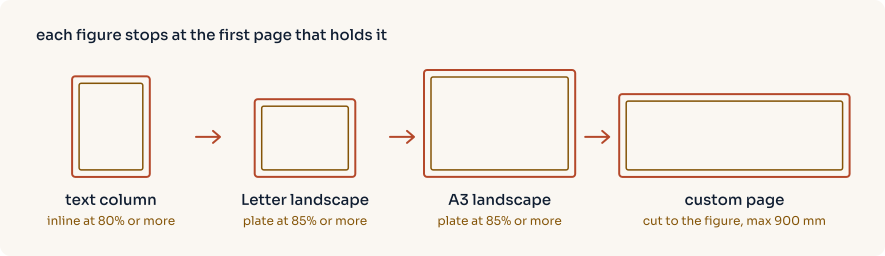
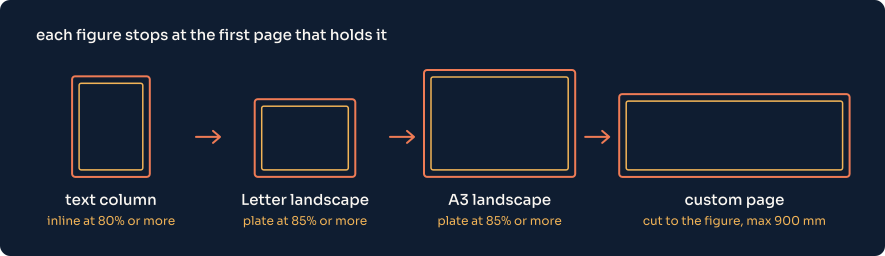
All four appear in the seven-page sample PDF, exported from one Markdown file.
Release packages
Published Windows installers require publisher signing and timestamps, the Apple Silicon app requires signing and notarization, and Linux packages require their platform checks. See release status for availability, recorded coverage and remaining qualification.
What it does
-
Eight input formats
Word, Excel, Markdown and delimited text export directly. DOC, ODT and RTF go through a converter you already have installed; Plate|Fold never ships one.
-
Pages chosen per figure
Inline at 80% of natural size or better, then Letter landscape and A3 landscape plates at 85% or better, then a custom page up to 900 mm wide. Wide tables take the same ladder.
-
Vector Mermaid
Diagrams render to SVG in a headless Chromium and stay vector in the PDF. Mermaid ships inside the package, so exports don't need Node.js or a network connection.
-
Themes as data
Ten built-in palettes, from ivory paper to dark screen-reading themes. A custom theme is a small JSON file that overrides only the colours you change, and a Word or Excel file can supply its own.
-
Built for scripts too
--jsonreturns a versioned result with page counts, warnings and exit codes, and the same export service is callable from Python. -
Export in a browser
An optional authenticated Linux server runs the same engine behind a job API, with uploads, cancellation and hash-checked downloads.
Warnings and limits
A missing image or a Mermaid diagram that fails to parse gets a visible warning box in the PDF and an entry in _export-report.json. An Excel chart gets one too, because charts are not redrawn. The export still exits with 0, so scripts should check the result's status.
Remote images aren't fetched, document scripts don't run, and references outside the input folder are reported as missing. The security page has the resource limits and link handling.